
Beyond the Basics: Unexpected Ways to Use Google for Your Next Trip

Google’s free apps are a powerful resource for travelers. While you've likely used Google Maps for directions or dabbled in Google Translate, many of these tools have powerful features you might be overlooking.
Some are built specifically for travel. Others can be creatively repurposed for everything from planning your trip to capturing memories.
If you’d like to see how they can help with each stage of your journey, download our free guide
A Quick Word on Privacy
Be aware that Google collects significant data about your activities to personalize services and ads. We recommend reviewing Google’s privacy policies and these guidelines from Consumer Reports on changing your settings to protect your privacy.
Google Apps Built for Travel
You're likely familiar with these, but let's uncover some hidden gems you might have missed.

Google Travel (and Explore)
Google Travel bundles several tools for planning your itinerary, and searching for flights, hotels, and vacation rentals. It also shows popular destinations based on your location.
- Pro-Tip: In the menu, under “Settings” (the gear icon), you can set price alerts for flights and hotels.
- Use the 'Explore' Tab: This is one of the most powerful, lesser-known features. Leave the destination blank, select your dates, and you can:
- See flight prices (under Settings) for destinations around the world on an interactive map.
- Get Price Insights to see if current flight prices are high, low, or typical based on historical data.
- Check airline recommendations and ticket prices.
- View average prices for hotel and vacation rentals.
- Find the best time to go to your chosen destination with data on peak/off-season months, average temperatures, and weather.
- Browse popular questions from Google Search to learn about a destination (travel requirements, walkability, local culture, etc.).

Google Flights
Google Flights provides in-depth data to research flights and track price changes. Although there are many other apps for finding flights, it's the first place I look once I know my destination. If your dates are flexible, use the date grid and price graph to find the cheapest dates to travel.
To save more money:
- Set price alerts (as noted earlier) to get emails when a fare changes.
- Mix and match airlines by combining one-way flights instead of only considering round trips.
- Search nearby airports to see if flying out of a different city is cheaper.
- New AI Feature: You can now ask Google's AI to find flight deals for you.
Google Hotels
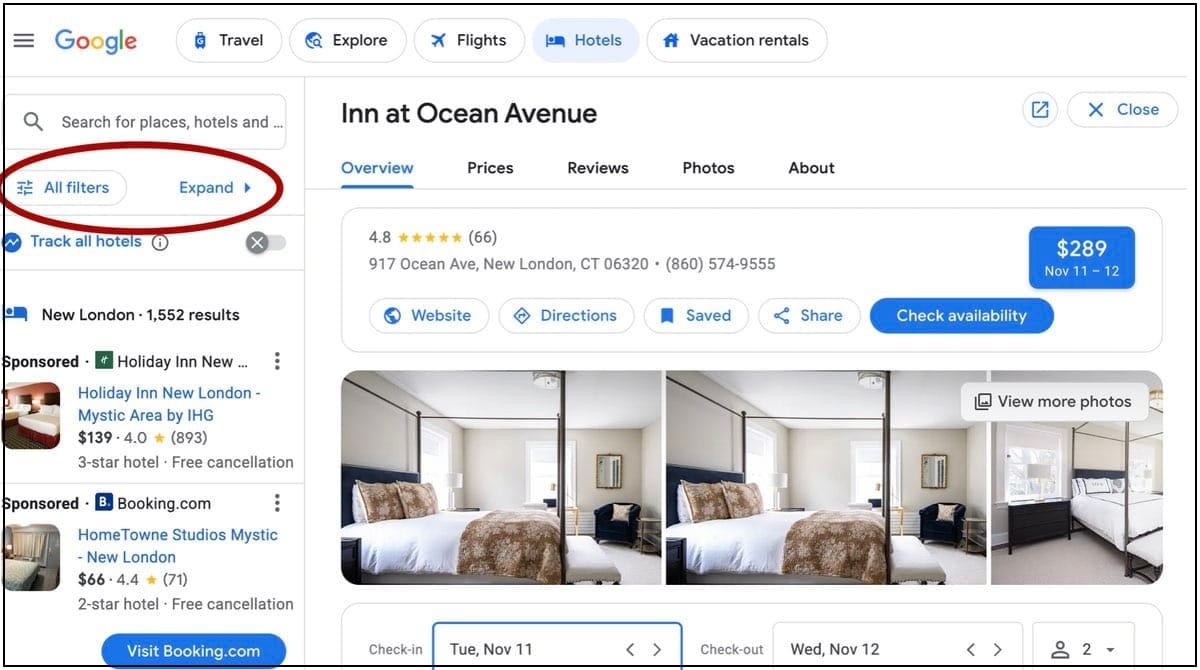
With Google Hotels, you can compare prices across booking platforms, get price insights, find curated recommendations, and even view hotel sustainability practices. Note: Some of the functionality noted below is different on mobile.
Once you choose a location, click "Expand" to drill down for more details:
- "Where to stay" gives you information about the local area.
- "When to visit" shows weather, popularity, and price ranges by month.
- "What you’ll pay" provides price insights by star rating, helping you see if current rates are high, low, or typical.
- Then, scroll down to view recommendations for restaurants, attractions, and more from travel guides and blogs.
- Don't forget to select "All filters" to refine your accommodation preferences.
- Use the map view and expand it to see points of interest. Then you can check walking or driving distances.
Vacation Rentals
This tool provides listings for houses, apartments, and cottages. The controls in the map make it especially useful for searching by neighborhood.

Google Maps
You know Maps for directions, but its real power for travelers lies in its offline and discovery features.
- Download Offline Maps: Especially useful when you don’t have internet access. That would have saved me from getting lost in Venice when my cellular connection dropped. The narrow streets and brick buildings are great at blocking signals!
Beyond basic navigation:
- Search Along Your Route: After setting directions, use "search along the route" to find restaurants, gas stations, or things to do. Use specific terms like "hidden cafe" or "local favorite" to uncover less obvious spots.
- Create Custom Lists: Save restaurants, attractions, and local spots to your own lists. Download that map so you can wander without a connection. Don’t forget to "star" your hotel's address. Save your fav's, so when you're putting your memories together, you remember where you were.
- Navigate in Real-Time: Use the mobile app to track your progress on public transit. I relied on this on a Lisbon bus when I couldn’t understand the muffled PA system and the front display was broken. It saved me from walking extra blocks after I had already logged miles that day.
- Use Street View: Grab the "Peg Man" from the lower right corner to virtually "walk" a street. Zoom in on side streets to find unique cafes, boutiques, or street art.
- Share your location with friends or family via a link.
- Create Your Own Maps: Use Google My Maps to build custom walking tours. Here's how to how to use it.
And here's how to use it with AI.

Google Translate
Beyond simple text translation, Google Translate is your go-to language assistant:
- Real-Time Conversation: Select two languages and tap “Conversation.” The app will translate each person's speech as they talk.
- Camera Translation: Just point your phone's camera at text, like a street sign or menu, to see the translation overlaid on the image.
- Offline Mode: Download languages to your device to use Translate without an internet connection.
- Phrasebook: Save your most-used words and phrases for quick access.
- Tap to Translate: Enable this to translate text in other apps (like WhatsApp) without switching apps.
- Website & Document Translation: Plug a website address into Google Translate on your desktop to translate the whole site. This is incredibly useful for booking a room directly with a hotel versus using a third-party site. For attraction tickets, I’ve found it can be much cheaper than a site like Viator, and sometimes they have more availability (as I experienced when trying to get Vatican tickets).
In Google Chrome, translation is built-in. Other browsers like Microsoft Edge and Safari have their own built-in translation features. Firefox relies on extensions, including the Google Translate add-on.

The Google App (for Android and iPhone)
The main Google App for mobile itself has key travel features:
- Search: Use it for quick conversions (currency, units), time zones, and flight status (just search the flight number). Search "sunrise in [city]" to find the golden hour for photos. You can search with "AI Mode" as well.
- Voice Search: Tap the microphone to search hands-free, which is especially useful when you're handling luggage.
- Lens: Use your camera to identify landmarks, artwork, or a dish you’re eating. It can also identify plants, animals, and products. And when you’re bored on a long flight? Select “Create” to play AI dress-up with your selfie.
- Translate: You can access this feature from the app as well.
Creative Ways to Use Multi-Purpose Google Apps for Travel
These apps aren't just for work. Here’s how to repurpose them for your next trip.

Google Assistant
This AI-powered virtual assistant is great for hands-free tasks like setting reminders, checking your flight status, navigating, and finding local spots. Ask it to "make a reservation at [restaurant]" or "share my ETA with [contact]."
Keep in mind its limitations: It needs a stable internet connection and can struggle with complex commands (like booking a rental car).
Note: Google Assistant is being discontinued on most mobile devices by the end of 2025 and is being replaced by the new AI assistant, Gemini. Devices that cannot meet the minimum requirements for Gemini (at least 2GB of RAM and Android 10) will retain access to Google Assistant until March 2026 (as far as we know). Meanwhile, Google is removing many of Assistant's features to streamline the transition.

Google Calendar
Keep your entire itinerary—flights, hotels, and activities—in one calendar, synced across all your devices.
- Automatic Imports: It can automatically pull bookings for hotels, flights, and car rentals from your Gmail confirmations (so much easier than digging through emails!).
- Time Zone Adjustments: It automatically adjusts to different time zones as you travel.
- Shareable Calendar: Create a trip-specific calendar to share with your group or keep family and friends in the loop.

Google Chrome
Chrome’s AI mode can help with broad searches (e.g., “find warm travel destinations in January where the U.S. dollar has the best value”). But its real travel power comes from extensions you can find in the Chrome Web Store:
- TripIt: Organizes your travel plans by keeping track of all your booking details.
- RatePunk: Compares hotel prices across various booking sites and shows customer ratings.
- Travel Mapper: Helps you add places and activities from any webpage directly to a Google Sheets itinerary.

Google Docs & Drive
Use Google Docs to create a mobile-friendly itinerary and store it in Google Drive. This makes it accessible from any device and easy to share with your travel group.

Google Earth
Google Earth is a fantastic tool for inspiration. Get virtually lost exploring the other side of the planet, right down to the street level.
- Historical Imagery: See how a place has changed over time.
- Save Locations: Find a specific landmark and save it to a map project in your Google Drive.
- Measure Distance: Easily measure the distance between two points.

Google Gemini (AI)
Gemini can act as your personal travel planner. Ask it to create a personalized itinerary, search for real-time flight and hotel info, and learn about your surroundings in real-time.
- Get customized suggestions for activities, restaurants, and packing lists.
- Get real-time translations of conversations with the Live View feature.
- Create personalized itineraries by letting it learn from your past Google searches and bookings.
- Use "Gems": Create a specialized "Trip Planner" Gem to act as your personal AI assistant to brainstorm destinations and create itineraries based on your preferences.

Google Keep
This note-taking app can be your secret weapon. Create lists, save images, record audio, and access it all offline from any device.
- Location-Based Reminders: Set a note to pop up when you arrive at your hotel or a specific landmark, so you have just the right info when you need it. Works when you're offline too.
- Transcribe Text: Use the "grab image text" feature from photos of menus or signs.
- Quick Notes & Photos: Save notes, pictures, and audio as you wander. I found this useful in Waikiki to remember where I wanted to return to for souvenirs.
- Use Hashtags: Organize notes with tags like
#ParisTrip. - Photo Log: Take photos and add notes to remember what and where they were. This was invaluable in Kyoto when I stumbled upon unique shops not found in any guidebook or YouTube video.
- Collaborate: Share packing lists and itineraries with travel buddies.
- Drawing Tool: Quickly draw with a choice of pens, colors, and grids, or annotate any image, like defining a route on a map.

Google Wallet
Store your payment cards, loyalty cards, event tickets, and transit passes. Its tap-to-pay feature is fast and secure. It can also hold digital IDs, car keys, or health passes.

Google Workspace (for Digital Nomads)
If you're working while traveling, Workspace (Docs, Sheets, Calendar) helps you stay organized.
- Sync Reservations: Automatically pull flight and hotel info from Gmail into a single trip timeline on Google Travel.
- Group Planning: Collaborate on a single Google Sheet where everyone can see and edit updates.
- Virtual Meetings: Use Google Meet to connect with your group, family, or clients.
Our Favorite Hidden Gems
Google Travel: Use Settings to set price alerts for flights and hotels.
Explore Tab: Learn about peak/off-peak months, average temps, and weather to choose the best time to go.
Flights: Let Google's AI find the best deals.
Google Hotels: Click "Where to stay" and "When to visit" for deep-dives into the local area.
Google Maps: Navigate public transit or drag the "Peg Man" for street-level views.
Google Translate: Use your camera to instantly translate menus, signs, or food packaging.
Google App for mobile: Use Lens to identify a dish you plan to order by taking a picture of it.
Gemini AI: Translate conversations in real-time with Live View.
Google Calendar: Automatically import booking confirmations from Gmail.
Chrome: Use the Travel Mapper extension to build an itinerary from any web page.
Google Earth: Use Timeline to see how a place has changed over the years.
Google Keep: Set time- or location-based reminders, so critical information appears just when you need it.
Beyond Google
As you can see, Google offers an extraordinary suite of tools for every stage of your journey, from inspiration and booking to navigating and capturing memories.
Yet, Google is only the beginning. There are hundreds of other travel apps, with new ones being developed every day to fill in where Google leaves off. You’ll find many of them in our searchable directory of travel apps.
Google and all associated brand names are trademarks of Google LLC, and this post is not endorsed by or affiliated with Google in any way.